Project info block
Project, address, GC, preparer, walkthrough date and phase.
Free construction punch list template
A professional construction punch list for Word and Excel. Print it for the walkthrough, or track it live with status dropdowns and auto-counts.
Free. No email required. Use it on any project, any size.
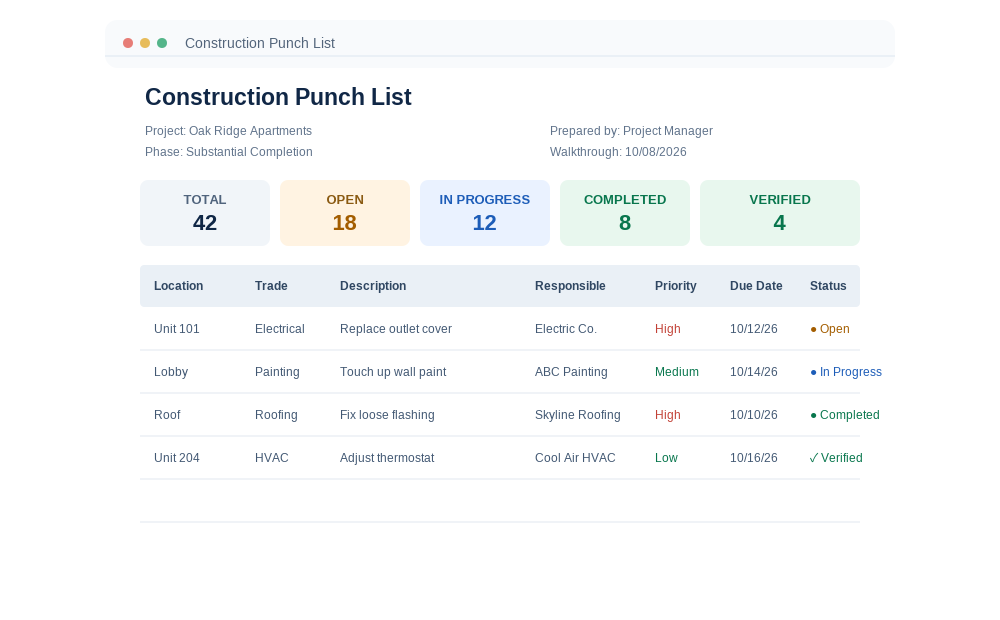
Project, address, GC, preparer, walkthrough date and phase.
Location, trade, description, responsible party, priority and due date.
Open → In Progress → Completed → Verified, with owner verification as the final gate.
For the contractor and the owner’s representative.
A punch list is the written record of everything standing between “almost done” and “done” — the deficiencies found at substantial completion that the contractor must fix before final payment.
Walk the site room by room, not trade by trade — you’ll catch more. Write items so a sub who wasn’t on the walkthrough could find and fix them: “Unit 204 kitchen — touch up paint at north wall outlet cover, match eggshell” closes; “paint touch-ups throughout” never does. Assign a responsible party and a due date to every line before the walkthrough ends, while everyone is still standing there.
Then protect the status workflow. The sub marks work Completed; only the owner’s representative marks it Verified. That separation is what keeps items from quietly reappearing at closeout.
Re-walk, verify, collect both signatures. An unsigned punch list is an opinion — a signed one releases retainage.
The document created near project completion listing work that doesn’t conform to contract specifications — incomplete items, defects, and damage — that the contractor must resolve before final payment and closeout.
Typically the owner’s representative, architect, or GC’s project manager during the substantial-completion walkthrough, with items assigned to the responsible subcontractors.
Same structure. Word is best for printing and marking up on a clipboard. Excel adds dropdowns, automatic row coloring, and a live summary — better when one person maintains the list across re-walks.
Yes. Download either file and use it on any project, commercial or residential. No signup, no watermark.
Same punch list as a shareable link: subs update their own items from a phone, photos attach to lines, and the owner verifies from anywhere. Leave an email and get it the day it launches.